
Copilot training - Microsoft 365

Microsoft Copilot training: AI inside your own files

The prompting method first, then the Copilot path, then the automations that run without you. Online, at your own pace.

9.4 / 10 from 497 reviews
78 lessons, 7 of them on Copilot
7h 52min of reading and exercises
Microsoft 365 - the five doors into Copilot
The five Microsoft 365 applications where Copilot lives, and what each one allows

What you learn to drive

Copilot, door by door

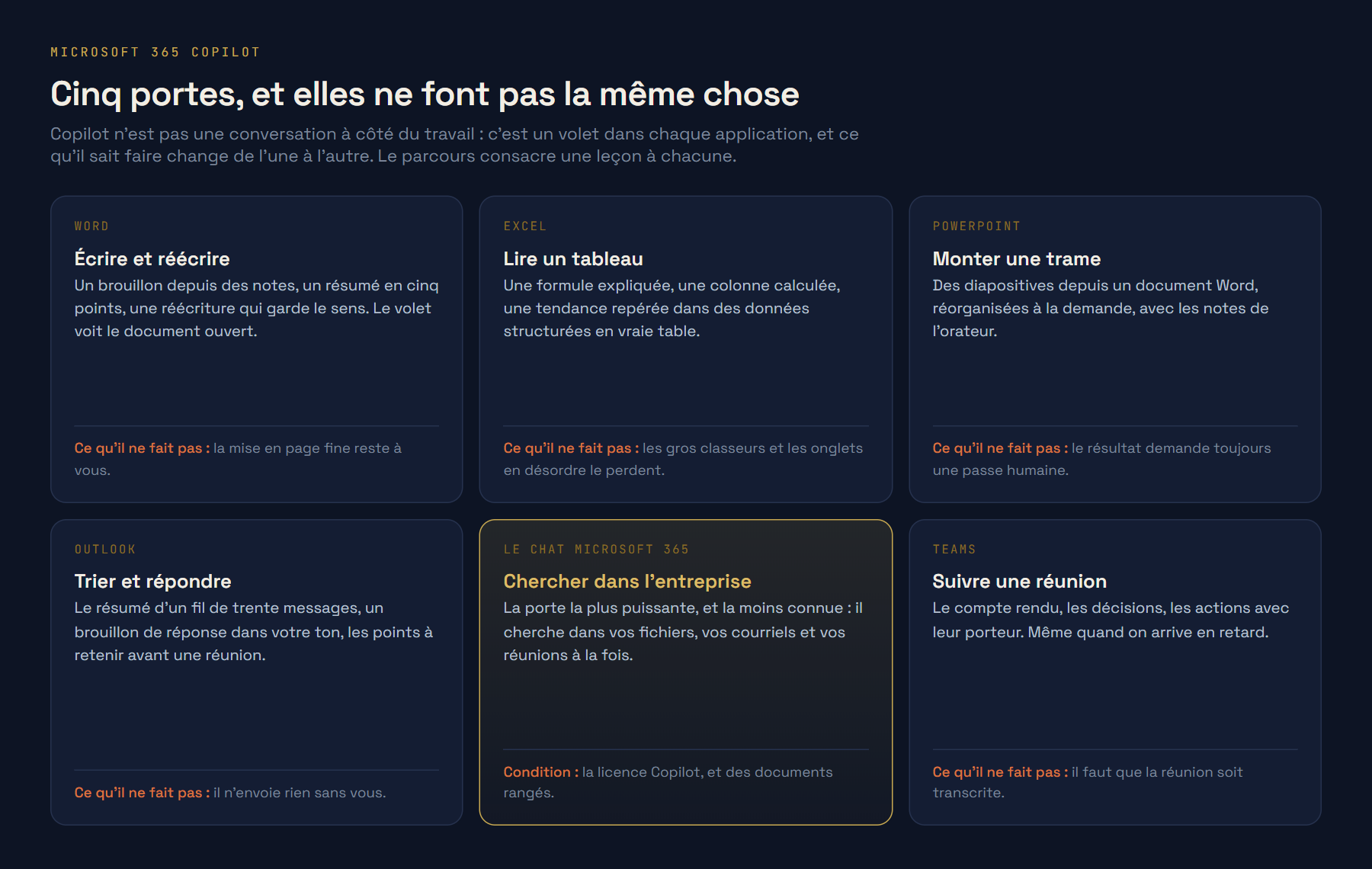
Two diagrams rather than two screenshots: what matters with Copilot is not how the pane looks, it is what each application allows and what it is allowed to read.

The five Microsoft 365 applications where Copilot lives, and what each one allows
  • WordA draft from notes, a five-point summary, a rewrite that keeps the meaning. The pane sees the open document, so you stop pasting text into another window.Lesson 3: Copilot in Word.
  • ExcelA formula explained, a column calculated, a trend spotted. Provided the data is a real table: that is the first thing the lesson has you check.Lesson 2: Copilot in Excel.
  • Microsoft 365 ChatThe most powerful door, and the least known: it searches your files, your email and your meetings at once. It is the one that justifies the licence.Lesson 1: the door almost nobody opens.
  • TeamsThe recap, the decisions, the actions and their owners, even when you joined late. The meeting has to be transcribed, and the lesson shows how to make sure it is.Lesson 6: Copilot in SharePoint and Teams.

On the way out

What you will be able to do with Copilot

Not knowledge about AI. Things you hand to someone.

01

A thread turned into commitments

Thirty-two messages in, a list of who promised what and by when out, with the open ones flagged.

02

A meeting you did not attend

The recap, the decisions and the actions with their owners, from the Teams transcript.

03

A document drafted in Word

From notes to a first draft in the document itself, then rewritten without losing the meaning.

04

A spreadsheet that explains itself

A formula in plain language, a calculated column, and the trend you had not spotted.

05

A search across the company

Microsoft 365 Chat used properly: files, email and meetings questioned at once.

06

The right tool at the right moment

A way of choosing between Copilot, Claude, ChatGPT and Gemini that does not expire at the next release.

The method, applied to Copilot

The same request, written twice

What the course changes sits in this gap. Five parts to put into a request: context, role, action, format, tone.

What most people type

YouSummarise this thread.

This thread concerns an ongoing project. Several participants discussed timelines and deliverables. Adjustments were mentioned and some decisions remain to be confirmed. It is suggested that discussions continue to clarify the open points.

The same one, once the method is learned

You

The Copilot path

The 7 lessons of the module

They come after the prompting method and before the automations. You choose one tool, and the path keeps only that one.

  1. 01 Where Copilot lives, and what each door can do 7 min
  2. 02 Copilot in Excel 7 min
  3. 03 Copilot in Word 7 min
  4. 04 Copilot in PowerPoint 7 min
  5. 05 Copilot in Outlook 7 min
  6. 06 Copilot in SharePoint and Teams 7 min
  7. 07 Creating a Copilot agent 7 min

Honestly

What Copilot does better, and where it struggles

A course that only praises its tool is worthless on the day the tool lets you down.

Where it leads

  • It works inside your company files, where the other three wait to be handed the document.
  • Outlook thread summaries and Teams recaps: two immediate wins, in the first week.
  • It respects your existing access rights, which reassures an IT department.
  • It is already deployed at your company, often without anyone asking what to do with it.

Where it struggles

  • Everything depends on the licence: without it, half this page does not concern you.
  • In Excel, large workbooks and badly structured data lose it quickly.
  • It sees neither the local drive, nor non-Microsoft tools, nor untranscribed meetings.
  • It reaches less far than Claude into third-party tools, and produces no artifact on screen.

It may not be your tool

The path is chosen at the fourth module, and it can be changed. If your company runs on Google Workspace, start with Gemini.

The full programme

Copilot is one stage, not the whole course

What you buy is a course on using artificial intelligence at work. Copilot is its way in if your company runs on Microsoft 365.

Getting started

Understand what you are handling, learn the method, and open the tool you already have.

  • Welcome and diagnostic
  • Understanding generative AI
  • The prompting method
  • Copilot, Gemini, Claude, ChatGPT (one of four)
Getting good

Go further in the request, judge what comes out, protect your data, and do your real work with it.

  • Advanced prompting
  • Judging an answer
  • Your data and the rules of use
  • Writing, translating, summarising
  • Beyond text: image, video, audio
  • Business use cases
  • Figures and spreadsheets
  • Meetings, minutes and messages
  • Serious research and monitoring
  • Presenting and convincing
Putting it to work

Plug AI into your tools with an MCP server, build chains that run without you, and frame the team that uses them.

  • Agents and automations
  • Building your MCP base
  • Advanced use cases
  • The foundation: making it last
  • Managing a team that uses AI
  • Putting it to work

Pricing

One course, two months of access

The full path, your tool included, the assistant that answers while you learn, and the certificate at the end. Nothing is billed monthly.

You can add the automations later, without paying twice for what you already have.

The method

290 €

  • 78 lessons, 7h 52min
  • The Copilot path, 7 lessons
  • 18 exercises reviewed
  • 60 days of access
Start now

amounts read from the application

Questions

What people ask us about the Copilot course

Do I need the Microsoft 365 Copilot licence to follow the course? +

For the lessons on Word, Excel, Outlook and Teams, yes: those are licence features. The prompting method, judging answers and the rules around your data are learned without it, and they are the larger part of the path. We sell no Microsoft licences and take nothing from them.

My company bought Copilot and nobody uses it. Is this the right moment? +

That is the most common situation in our sessions. A licence rolled out without training produces three uses: the meeting recap, the email draft, and abandonment. The path covers the five doors one by one, and above all what each one cannot do, which stops people expecting the impossible.

How much time does it take? +

Around seven to eight hours of reading and exercises across the path, spread however you like over your access period. Most learners do one lesson a morning, over about thirty days.

Is this online or in a classroom? +

Online, at your own pace, with exercises reviewed by a human. If you want a live session, in a room or remote, for a whole team, that is a different offer and we run those too.

Is there a certificate? +

Yes, a named certificate at the end of the path, listing the areas covered and the volume actually completed. It is not a diploma and we do not pretend otherwise.